
How to test SIGHUP Distribution locally with Apple's container Kubernetes Plugin
Apple's container Kubernetes plugin provides another way to test SIGHUP Distribution (SD) locally on an Apple silicon Mac.

Apple's container Kubernetes plugin provides another way to test SIGHUP Distribution (SD) locally on an Apple silicon Mac. It complements the established SIGHUP Distribution on minikube workflow and gives platform engineers a native macOS option for validating a configuration, exploring a module, reproducing an issue, or testing an upgrade before using shared infrastructure.
We continuously test SD on different Kubernetes environments and keep track of the tools available to our users. Apple's container CLI was a natural candidate when it introduced native local Kubernetes support. The result is a complete, reproducible SIGHUP Distribution lab that uses container k8s plugin, not a separate desktop VM manager or Docker runtime.
The lab deploys the same focused local profile used in the minikube guide, including ingress, logging, monitoring, tracing, Forecastle, and dynamic storage. It also covers the two Apple Container-specific details found during testing: installing a default StorageClass and selecting the current recommended guest kernel on hosts upgraded from an older Container version.
Scope: this is a disposable, single-node development and evaluation environment. It is not a production architecture. Local-path volumes are node-local, the cluster has no high availability, and services are accessed through kubectl port-forward.Apple Container in brief
Apple introduced container in 2025 as a command-line tool for building and running OCI-compatible Linux containers on Apple silicon Macs. Rather than placing every container in a shared Linux VM, it runs each workload in its own lightweight Linux microVM. The runtime uses Apple's open-source Containerization framework, the macOS Virtualization and vmnet frameworks, and a Kata-based Linux guest kernel.
The k8s plugin arrived in Container 1.2.0, released in July 2026. It creates a local single-node Kubernetes cluster from a kindest/node image, writes a kubeconfig, and imports locally built images directly into the node's containerd image store. The plugin remains experimental, so its commands and behavior can change between releases.
This walkthrough was verified with Container 1.4.1, Kubernetes v1.35.5, SIGHUP Distribution v1.35.1, and furyctl v0.35.1 on an Apple silicon Mac running macOS 26.
Prerequisites
Use an Apple silicon Mac running macOS 26 with a working internet connection, kubectl, and approximately 16 GB of memory available for the virtual machine. The commands create an isolated working directory and kubeconfig, leaving an existing ~/.kube/config unchanged.
Install kubectl with Homebrew if it is not already available:
brew install kubectl
kubectl version --client
Install the signed Container package from Apple's release page. The following command-line installation is equivalent to opening the package in Finder:
curl --fail --location --output container-1.4.1-installer-signed.pkg \
  https://github.com/apple/container/releases/download/1.4.1/container-1.4.1-installer-signed.pkg

sudo installer -pkg container-1.4.1-installer-signed.pkg -target /
rm container-1.4.1-installer-signed.pkg

container --version
container system start
Create a directory for the lab and set the variables used throughout the article:
mkdir -p "$HOME/sighup-apple-container-lab"
cd "$HOME/sighup-apple-container-lab"

export CLUSTER_NAME=sighup-local
export KUBECONFIG="$PWD/kubeconfig"
Create a Kubernetes cluster with Apple's container plugin
Container's Kubernetes plugin creates a cluster with a small default allocation. The local SIGHUP Distribution profile includes observability components, so allocate six CPUs and 16 GB of memory:
#k8s cluster creation
container k8s create \
  --name "$CLUSTER_NAME" \
  --cpus 6 \
  --memory 16g

#kubeconfig retreive when needed
container k8s write-config \
  --name "$CLUSTER_NAME" \
  --kubeconfig "$KUBECONFIG"

kubectl get nodes
kubectl get pods --all-namespaces
The expected result is one Ready control-plane node. In this release, Container uses kindest/node:v1.35.5 by default and configures the API endpoint in the dedicated kubeconfig.
If native cluster creation fails after an upgrade
The first version of this lab exposed an upgrade edge case. Updating the Container application does not necessarily replace a guest kernel selected by a much older installation. On a host upgraded from a pre-1.0 Container release, container k8s create failed during node preparation because the retained kernel did not support the nftables operation used by the Kubernetes plugin.
The error can be misleading because the last visible line may be a successful net.ipv4.ip_forward = 1 setting followed by node prep failed. The relevant remediation is to deliberately select Container's current recommended kernel, then remove the failed node and create it again:
container system kernel set --recommended --force
container k8s delete --name "$CLUSTER_NAME"

container k8s create \
  --name "$CLUSTER_NAME" \
  --cpus 6 \
  --memory 16g

container k8s write-config \
  --name "$CLUSTER_NAME" \
  --kubeconfig "$KUBECONFIG"
--force changes the default guest kernel, so use it deliberately on a workstation that depends on a custom kernel. Native cluster creation completed successfully after the kernel update. The upstream issue discussion contains the reproducible failure signature and confirmed kernel-upgrade result.
Prepare the container Kubernetes cluster for SIGHUP Distribution
The container k8s plugin installs the bundled kindnet CNI, but it does not install a default StorageClass. SIGHUP Distribution checks for a default StorageClass during its preflight checks, and several modules require persistent volumes. Install Rancher’s Local Path Provisioner and make its local-path StorageClass the default:
kubectl apply -f \
  https://raw.githubusercontent.com/rancher/local-path-provisioner/v0.0.34/deploy/local-path-storage.yaml

kubectl patch storageclass local-path \
  --type merge \
  --patch '{"metadata":{"annotations":{"storageclass.kubernetes.io/is-default-class":"true"}}}'

kubectl -n local-path-storage rollout status deployment/local-path-provisioner
kubectl get storageclass
Local Path Provisioner is appropriate only for this lab. It binds volumes to one Kubernetes node and does not provide replicated storage.
Fluent Bit needs more inotify capacity than the node default when it opens watches for container logs. Apply the SIGHUP on-premises values inside the Kubernetes node before installing the Distribution:
container exec "$CLUSTER_NAME" /bin/sh -ceu '
  mkdir -p /etc/sysctl.d
  cat > /etc/sysctl.d/99-sighup-local.conf <<EOF
fs.inotify.max_user_instances=8192
fs.inotify.max_user_watches=524288
EOF
  sysctl -p /etc/sysctl.d/99-sighup-local.conf
'
Confirm the effective values:
container exec "$CLUSTER_NAME" /bin/sh -c \
  "sysctl fs.inotify.max_user_instances fs.inotify.max_user_watches"
Install furyctl
Install furyctl 0.35.1 by following the official installation guide. Once the installation is complete, verify that the expected version is available:
furyctl versionMake sure the output reports version 0.35.1 before moving on.
Create a furyctl.yaml file
Create the furyctl.yaml in the lab directory. It uses the focused module selection from the minikube guide, adapted for the Kubernetes node created by the container k8s plugin:
cat > furyctl.yaml <<'EOF'
apiVersion: kfd.sighup.io/v1alpha2
kind: KFDDistribution
metadata:
  name: sighup-local
spec:
  distributionVersion: v1.35.1
  distribution:
    kubeconfig: "{env://KUBECONFIG}"
    modules:
      networking:
        type: none
      ingress:
        baseDomain: demo.example.internal
        nginx:
          type: none
        haproxy:
          type: single
          tls:
            provider: certManager
        certManager:
          clusterIssuer:
            name: letsencrypt-sighup
            email: example@sighup.io
            type: http01
      logging:
        type: loki
        loki:
          tsdbStartDate: "2024-12-03"
      monitoring:
        type: prometheus
      policy:
        type: none
      dr:
        type: none
        velero: {}
      auth:
        provider:
          type: none
    customPatches:
      patchesStrategicMerge:
        - |
          $patch: delete
          apiVersion: logging-extensions.banzaicloud.io/v1alpha1
          kind: HostTailer
          metadata:
            name: systemd-common
            namespace: logging
        - |
          $patch: delete
          apiVersion: logging-extensions.banzaicloud.io/v1alpha1
          kind: HostTailer
          metadata:
            name: systemd-etcd
            namespace: logging
        - |
          $patch: delete
          apiVersion: apps/v1
          kind: DaemonSet
          metadata:
            name: x509-certificate-exporter-control-plane
            namespace: monitoring
EOF
The node already uses the kindnet CNI installed by the container k8s plugin, so the furyctl.yaml sets networking.type to none. It deploys one HAProxy Kubernetes Ingress Controller, cert-manager, Loki, Prometheus, Tempo, Forecastle, and their supporting components. Policy, disaster recovery, and authentication modules are excluded to keep the test environment focused.
The three strategic merge patches are intentional. systemd-common and systemd-etcd are host tailers for systemd logs that do not exist in the container Kubernetes node. The control-plane certificate exporter has the same node-environment incompatibility. Removing only these components keeps the rest of the logging and monitoring stacks enabled.
The hostname and email in this sample are placeholders. A localhost-only cluster cannot satisfy a public ACME HTTP-01 challenge, so this environment is not expected to obtain a trusted Let's Encrypt certificate. Direct service port-forwards below avoid that limitation while testing the components.
Install SD on Container
Run the installation from the directory containing furyctl.yaml:
furyctl apply --outdir "$PWD"
The command downloads the pinned Distribution dependencies, verifies cluster access and the default StorageClass, applies the selected modules, and stores its state in .furyctl/. The initial download and deployment take several minutes, depending on network bandwidth and host resources.
After the apply reports success, inspect the installation:
furyctl get cluster-info

kubectl get nodes
kubectl get storageclass
kubectl get pods --all-namespaces
kubectl get pvc --all-namespaces
Every PVC required by the profile should be Bound. Kubernetes workloads can need a short settling period after furyctl apply; wait for the relevant rollouts:
kubectl -n monitoring rollout status deployment/grafana
kubectl -n logging rollout status daemonset/infra-fluentbit
kubectl -n ingress-haproxy rollout status daemonset/haproxy-ingress
Access Grafana, Forecastle, and ingress locally
Container publishes the Kubernetes API endpoint to macOS but does not provide a service LoadBalancer. kubectl port-forward is the portable way to access ClusterIP services from the Mac.
Start a Grafana port-forward in one terminal:
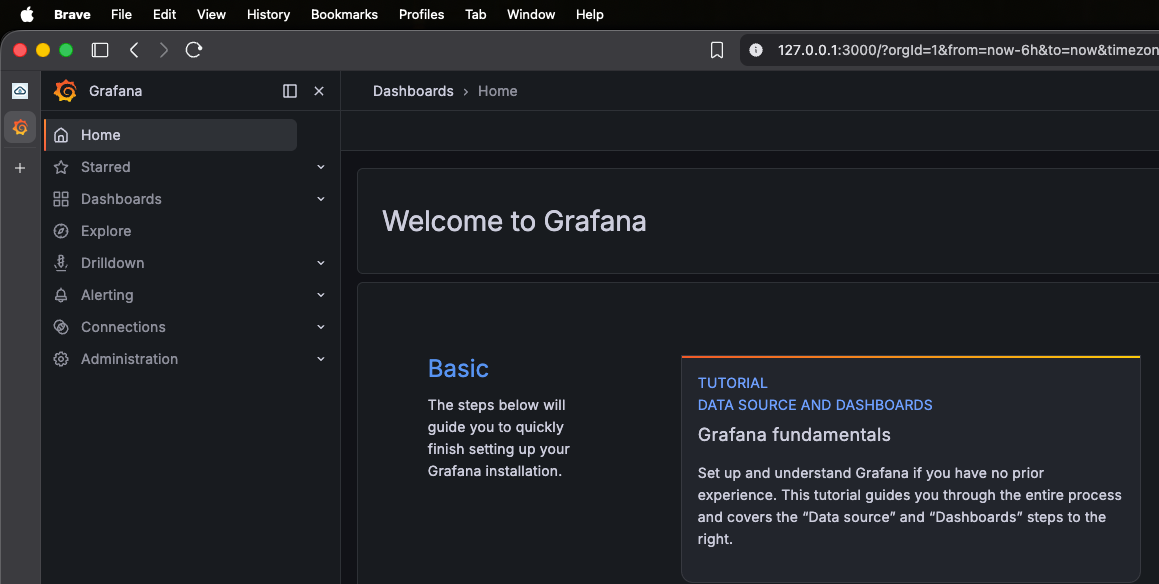
kubectl -n monitoring port-forward service/grafana 3000:3000
Open http://127.0.0.1:3000/login in a browser. Explore the preconfigured Kubernetes dashboards and use the Loki data source to inspect cluster and application logs.
In another terminal, access Forecastle:
kubectl -n forecastle port-forward service/forecastle 18081:80
Open http://127.0.0.1:18081. Forecastle presents the applications exposed by the Distribution.
The same approach can expose the ingress controller for local HTTP and HTTPS testing:
kubectl -n ingress-haproxy port-forward service/haproxy-ingress 30080:80 30443:443
Keep the relevant port-forward process running while using the service, then stop it with Ctrl-C.
Test the local image workflow without a registry
Apple Container can load a locally built OCI image directly into the Kubernetes node, so this test does not require a registry push. The image must be tagged and loaded with the same fully qualified name that Kubernetes uses. The following minimal NGINX example proves the complete local build, import, deployment, and service-access path:
If you opened a new terminal for the port-forward commands, restore the variables used by the remaining commands:
cd "$HOME/sighup-apple-container-lab"
export CLUSTER_NAME=sighup-local
export KUBECONFIG="$PWD/kubeconfig"
mkdir -p local-image-test
cd local-image-test
cat > Containerfile <<'EOF'
FROM docker.io/library/nginx:1.29-alpine
RUN printf '%s\n' 'Apple Container local image test' > /usr/share/nginx/html/index.html
EOF
container build -t my-service:dev .
container image tag my-service:dev docker.io/library/my-service:dev
container k8s load-image \
--name "$CLUSTER_NAME" \
docker.io/library/my-service:dev
Apply a Deployment and Service that use the qualified reference and explicitly prevent Kubernetes from pulling it:
kubectl apply -f - <<'EOF'
apiVersion: apps/v1
kind: Deployment
metadata:
  name: my-service
spec:
  replicas: 1
  selector:
    matchLabels:
      app: my-service
  template:
    metadata:
      labels:
        app: my-service
    spec:
      containers:
        - name: my-service
          image: docker.io/library/my-service:dev
          imagePullPolicy: Never
          ports:
            - containerPort: 80
---
apiVersion: v1
kind: Service
metadata:
  name: my-service
spec:
  selector:
    app: my-service
  ports:
    - port: 80
      targetPort: 80
EOF

kubectl rollout status deployment/my-service
kubectl port-forward service/my-service 18080:80
While the port-forward is running, request the test page from another terminal:
curl --fail http://127.0.0.1:18080/
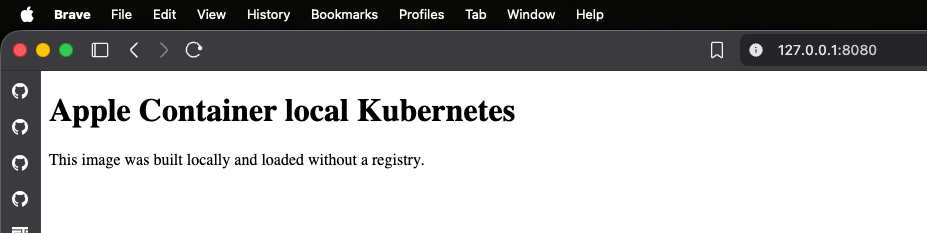
The response is Apple Container local image test. Stop the port-forward with Ctrl-C.
For image-name troubleshooting, inspect the node's CRI image store. The reference shown here must match the image field in the Deployment:
container exec "$CLUSTER_NAME" /bin/sh -c \
  "crictl images | grep 'docker.io/library/my-service'"
Tear down the lab
When the test is complete, remove the single-node Kubernetes cluster and its local data:
container k8s delete --name "$CLUSTER_NAME"
Another local test path for SIGHUP Distribution
This test confirms that SIGHUP Distribution's existing-cluster installation path works with Apple Container Kubernetes. The resulting lab includes Loki for centralized logs, Prometheus and Grafana for monitoring, tracing, ingress, dynamic local storage, and Forecastle.
Apple's container Kubernetes remains experimental and should be used as a developer and platform-engineering environment, not as a production substitute. Its per-workload microVM model, native macOS integration, dedicated k8s command set, and direct local-image loading make it a useful additional local test path alongside minikube for SIGHUP Distribution users on Apple silicon.
